
Discord
Some useful things to know about how Discord works
Our Discord has become one of the main platforms to talk about animation, especially in FoundryVTT.
We’ve created a small home for a few developers that have created modules around the subject of animation. That’s why we have so many channels! We’ve created categories to make it clearer and if you’ve read the Prerequisites and Understanding Animation, you should get a better picture.
-
Be courteous and respectful to the community. We are welcoming of everyone regardless of age, race, gender identity, or sexual preference.
-
Do not use derogatory language or engage in harassing behaviour. We have no tolerance for slurs or targeted attacks against individuals or groups.
-
This Discord server is open to the public, so please keep conversations to an approximate PG-13 rating.
-
This server is not an appropriate forum for discussion of political, religious, or ideological views.
-
You are responsible for your own behaviour here. Happy, sad, drunk, high, or otherwise, please be aware of how your conduct will affect others.
-
Constructive debate is welcome, heated arguments are not. If a conversation turns into an argument, we ask all parties to disengage. If mediation is required, please contact staff instead of trying to arbitrate the situation yourself.
-
We do not endorse or offer support for any software, modules, or sites which violate copyright or encourage piracy. Any discussion related to copyright infringement will be removed.
-
We have some topic specific channels. Sometimes a conversation will need to move, which doesn’t mean it needs to end.
Channels and Roles
Section titled “Channels and Roles”During the onboarding, the first time you join the server, you can choose which channels you might be most interested in. You can always join or quit channels later by clicking on the “Channels & Roles” button at the top.
Patreon Exclusive Roles
Section titled “Patreon Exclusive Roles”How to enable your Patreon roles:
-
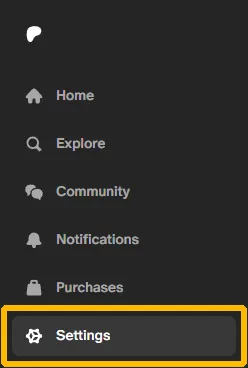
Go to your Patreon account settings.
-
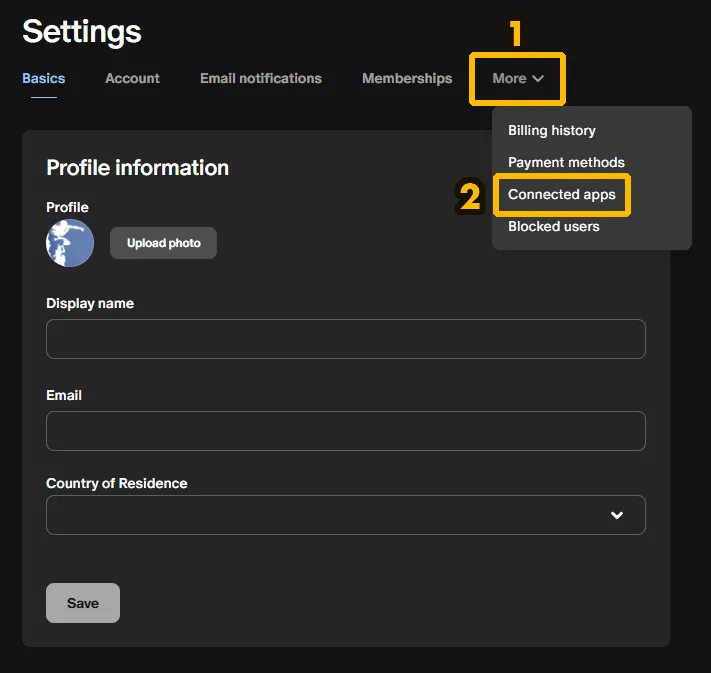
Click on “More” and then, the “Connected Apps” option.
-
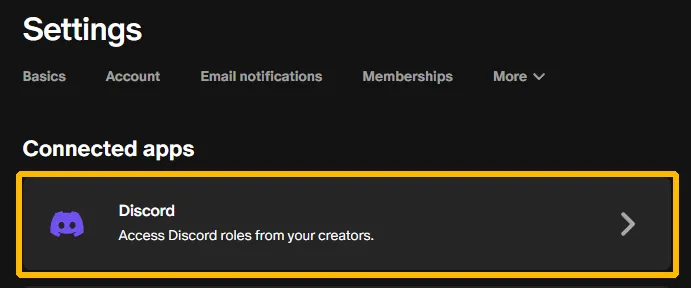
Once you’ve connected your Discord account here, you should be assigned your role automatically in our Discord server, corresponding to the tier at which you’ve joined.
-
It may take a moment. Try restarting the Discord application.
Opt-in Roles for Notifications
Section titled “Opt-in Roles for Notifications”Having joined many Discord servers ourselves, we understand how notifications can become quickly disruptive or even annoying if overdone. We have decided to create an “opt-in role” system where you can choose which subjects you’d like a notification about.
The only time we’d use the @everyone notification is for important notices or we really want to share something with you.
Search function
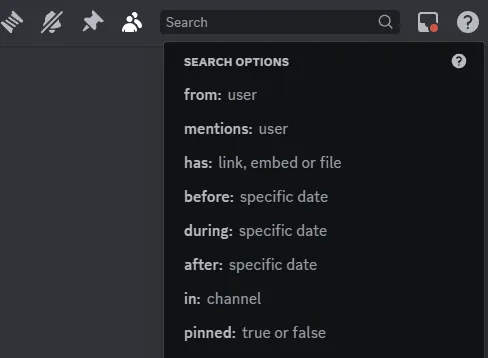
Section titled “Search function”The search function on Discord can be quite useful, once you know how to use it. When you click on the search field in Discord, plenty of options appear that can help you restrict the search to specific user, channels, date…etc
Syntax Highlighting
Section titled “Syntax Highlighting”Discord uses the Markdown language and you can use Syntax Highlighting. Here’s how:
```jsType or Paste your code here```Let’s have a look at a simple example. If you write this exactly in a Discord post:
```jsconst text = "Hello World";Console.log(text);```It would then appear in Discord like so:
const text = "Hello World";Console.log(text);